Learn how to fill UPSC DAF-2 for the Civil Services Interview. Visit the UPSC Online Portal after the Mains result, log in with your OTR credentials, and complete the form accurately. To appear for the UPSC Civil Services Interview, candidates who qualify for the Mains examination must complete the DAF-2 (Detailed Application Form-2) on the official UPSC website. Candidates should log in using their credentials once the UPSC Mains Result is declared and the DAF-2 window opens. DAF-2 is a crucial part of the UPSC interview preparation, as it contains detailed information about your education, employment, hobbies, achievements, service preferences, and other personal details. The information provided in the DAF-2 can become the basis for many questions during the UPSC Personality Test. Therefore, candidates should fill out the form carefully and prepare thoroughly for every detail mentioned in their DAF-2. DAF-2 is an important form for UPSC candidates who qualify for the Civil Services Main Examination and move to the next stage of the examination. Candidates need to fill in the required details. Therefore, it should be filled out carefully and correctly.
What is DAF-2?
DAF stands for Detailed Application Form. The DAF-2 is an online application form that candidates must submit after qualifying the UPSC Civil Services Main Examination. It is an essential step before appearing for the UPSC Personality Test (Interview) and requires candidates to provide detailed information about their educational background, achievements, employment, hobbies, and other personal details. UPSC asks successful candidates to fill this form as part of the Civil Services Examination process. The form contains important information about the candidate. Candidates may have to provide details about their education, job, service preferences, and other information required by UPSC. The information given in the form should be correct because it becomes part of the candidate official record.
9 Simple Step by Step Guide to Fill DAF-2 for the UPSC Interview
To fill the UPSC DAF-2 (Detailed Application Form-2) for the Civil Services Interview, candidates who qualify for the UPSC Mains Examination must complete the form through the official UPSC online portal within the prescribed timeline. DAF-2 requires candidates to provide important details, including service preferences, cadre preferences, educational qualifications, employment history, achievements, hobbies, and other relevant information. Candidates should fill out the UPSC DAF-2 carefully as the information provided in the form plays an important role in UPSC Interview preparation.
Fill DAF-2 for the UPSC Interview
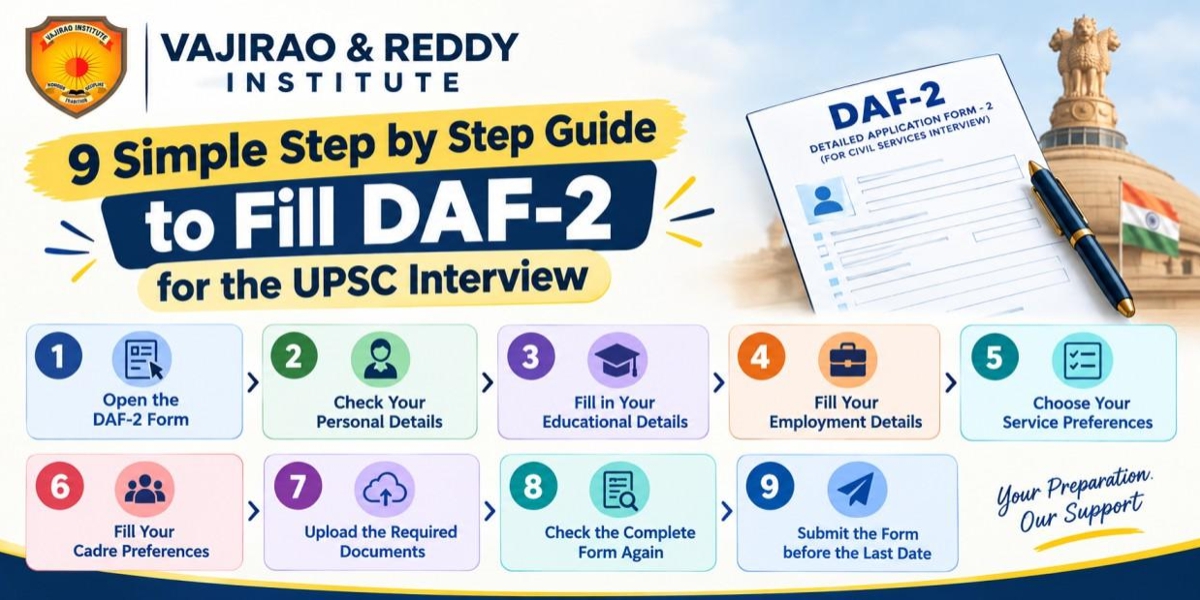
The UPSC Interview Board may ask questions based on the candidate’s educational background, work experience, hobbies, achievements, preferences and other details mentioned in the DAF-2. Lets a look at the Step by Step Guide to fill DAF-2 for the UPSC Interview:-
1. Open the DAF-2 Form
First, visit the official UPSC website and log in to the application portal. Use your registration details to access the UPSC DAF-2 form. Before you start filling the form, read all the instructions carefully. This will help you understand what information and documents are required.
2. Check Your Personal Details
In this section, check your personal information carefully. This can include your name, date of birth, category, address, mobile number, and email ID. Make sure that these details are correct. Your information should match your official documents. For example, the spelling of your name should be the same as it appears on your certificates and other documents.
3. Fill in Your Educational Details
In this section, provide information about your education. You may have to enter details about your school education, graduation, post-graduation, or other qualifications. Before filling in these details, keep your marksheets and certificates with you. Check the name of your college, university, course, and year of passing carefully before submitting the form.
4. Fill Your Employment Details
This section is for candidates who are working or have worked earlier. You may have to provide details such as the name of your organisation, your job position, nature of work, and period of employment. Fill in the correct information. Do not provide incorrect details because UPSC may ask for supporting documents. If a particular detail does not apply to you, follow the instructions given in the form.
5. Choose Your Service Preferences
UPSC may ask candidates to give their preferences for different Civil Services. This means you may have to choose the order in which you prefer different services. For example, one candidate may prefer the Indian Administrative Service, while another candidate may prefer the Indian Police Service or another service. Choose your preferences carefully according to your own interest and career goals.
6. Fill Your Cadre Preferences
If cadre preferences are asked in the form, fill them carefully. A cadre is related to the area or state where an officer may be allotted for service, according to the applicable rules. Before selecting your preferences, understand the rules properly and think about your own preferences. Once the form is submitted, changing the information may not be easy or may not be allowed.
7. Upload the Required Documents
UPSC may ask you to upload certain documents. Before uploading, check the instructions related to the document format and file size. Make sure that the documents are clear and readable. Also, check that you are uploading the correct document in the correct section.
8. Check the Complete Form Again
Do not submit the form immediately after filling it. Take some time to check every section again. Check your personal details, educational information, employment details, and preferences. Correct any mistakes before final submission, if changes are allowed. A small mistake can create problems later, so it is better to check everything carefully.
9. Submit the Form before the Last Date
After checking all the information, submit the DAF-2 form before the deadline. Do not wait until the last day. Sometimes, the website may face technical problems because many candidates may try to submit their forms at the same time. After submitting the form, save or download a copy for your future reference.
Important Things to Remember While Filling DAF-2
To fill the UPSC DAF-2 (Detailed Application Form-2) for the 2026 Civil Services Personality Test, treat the DAF-2 as your primary interview blueprint. Review every detail carefully, including your educational qualifications, employment history, hobbies, service preferences, and home state. Prepare Home State Questions for UPSC CSE Interview by studying your state's history, geography, economy, culture, and major development challenges. Ensure all information is accurate, consistent, and supported by facts, as the interview board may ask follow-up questions to assess your clarity, honesty, analytical thinking, and decision-making abilities. Always fill the form with correct information. Keep your important documents with you while filling the form. This will help you enter the correct details. Read every instruction carefully before filling a section. Do not provide false information. Your details should match your official documents. Also, submit the form before the last date and keep a copy of the submitted form safely.
Common Mistakes to Avoid While Filling DAF-2
Avoid providing inconsistent personal information or mentioning hobbies that you cannot confidently discuss during the UPSC Personality Test. Every detail in your DAF-2 should be accurate, genuine, and well-supported, as the Interview Board may ask follow-up questions based on the information you provide. Candidates should avoid simple mistakes such as spelling errors and incorrect dates. Do not enter wrong information about your education or job. Check all your preferences carefully before submitting the form. Make sure that the documents you upload are clear and correct. Most importantly, do not wait until the last moment to fill the form.
- Data Inconsistency- Ensure your name, dates, qualifications, and other personal details match your official documents and previously submitted DAF-I.
- Careless Service and Cadre Preferences- Fill your service and cadre preferences thoughtfully. Do not rank services or cadres based on superficial factors, such as assuming a particular cadre will guarantee a preferred city or posting.
- Exaggerating Hobbies- Mention only genuine hobbies and interests that you can confidently discuss during the UPSC Personality Test. Avoid copying hobbies from toppers or listing activities simply to make your DAF-2 look impressive.
- Leaving Mandatory Sections Incomplete- Carefully review the entire DAF-2 before submission. Do not leave mandatory fields, declarations, or required information incomplete without a valid reason.
- Uploading Unclear Documents- Upload clear, legible, and valid documents wherever required. Blurry, incomplete, or improperly scanned certificates can create unnecessary complications.
- Ignoring the Final Review- Before submitting the UPSC DAF-2, cross-check every entry carefully. Incorrect information may be difficult to modify after submission.
Final UPSC DAF-2 Checklist
Submit your Detailed Application Form 2 (DAF-2) online through the Official UPSC Website immediately after passing the Mains written examination. Before submitting your UPSC DAF-2, Make sure you have:-
- Verified your name, date of birth, and personal details
- Cross-checked educational qualifications with your certificates
- Ensured consistency with your previously submitted DAF-I
- Carefully reviewed service preferences and cadre preferences
- Mentioned only genuine hobbies, interests, and achievements
- Verified employment and work-experience details, if applicable
- Completed all mandatory fields and declarations
- Uploaded clear and valid documents wherever required
- Proofread every entry for spelling and factual errors
- Saved or printed a copy of the submitted DAF-2 for future reference
- Started preparing for likely UPSC Interview questions based on your DAF-2
Conclusion
DAF-2 is an important form in the UPSC Civil Services Examination process. Candidates should fill every section slowly and carefully. Keep your documents ready, read the instructions, and check all the information before submitting the form. Always follow the instructions and deadlines given by UPSC for the particular examination year.